How Often to Replace Reverse Osmosis Filters
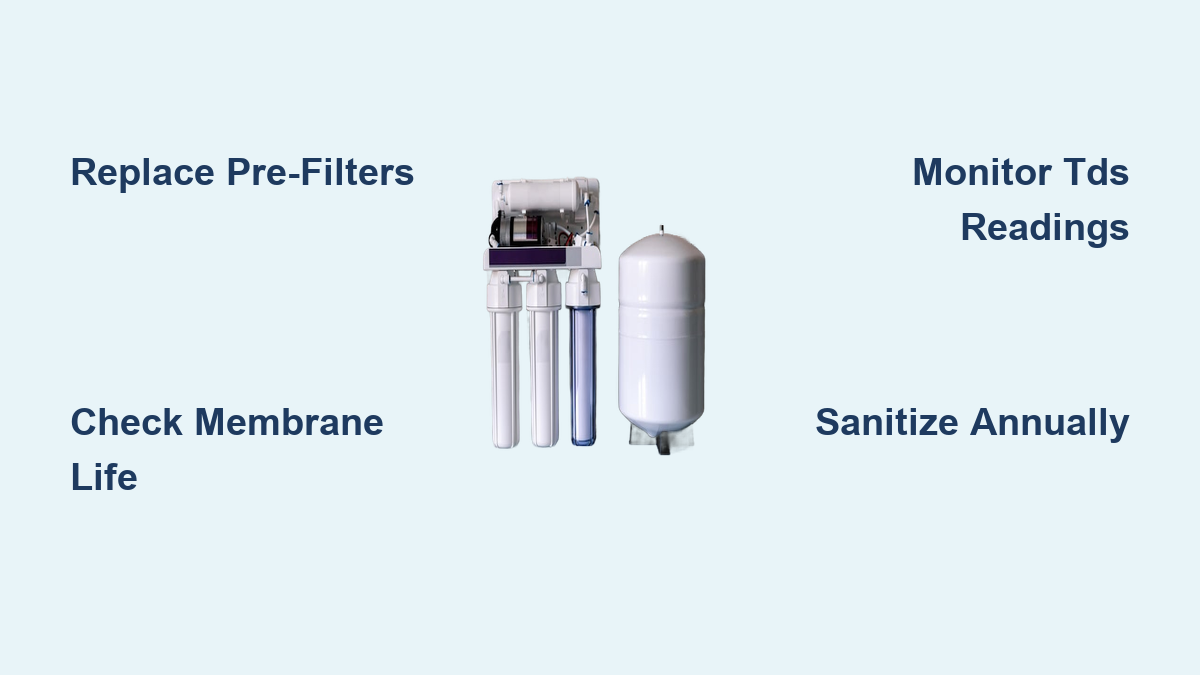
Your reverse osmosis (RO) system worked perfectly when you first installed it, but lately the water trickles out slower than usual and tastes a bit off. Before you assume the whole unit is failing, the answer is usually much simpler. Knowing how often to replace reverse osmosis filters is the single most important factor in keeping your system running efficiently for its full 10–15 year lifespan.
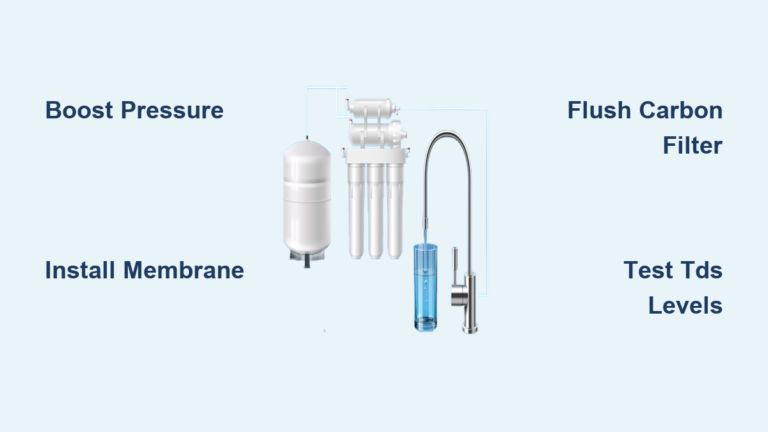
RO systems remove up to 99.9% of contaminants including lead, arsenic, bacteria, and PFAs, but they only perform when filters are fresh. The general rule is straightforward: sediment and carbon pre-filters every 6–12 months, the RO membrane every 2–3 years, and the polishing filter annually. However, your water quality, household size, and system type all influence the exact timing.
This guide breaks down exactly when to replace each filter, how to recognize warning signs of failure, and simple maintenance steps that protect your investment. Whether you’re on city water or a private well, you’ll get a clear schedule tailored to your situation.
Filter Replacement Schedules by Stage
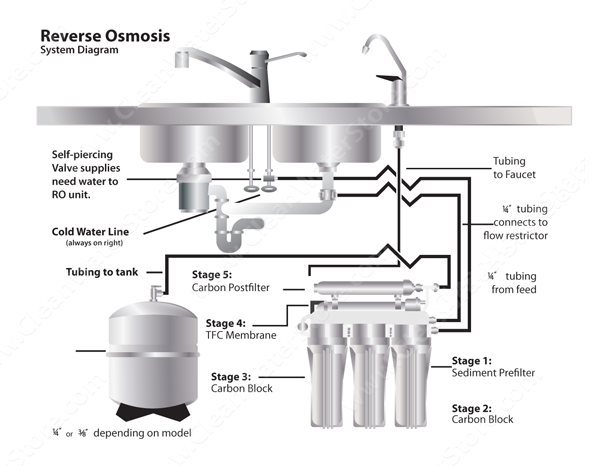
Each filter in your RO system has a specific job and lifespan. Replacing them on time keeps downstream components protected and maintains peak performance.
Sediment Pre-Filter: Replace Every 6–12 Months
The sediment filter (Stage 1) traps dirt, rust, sand, and silt before they reach sensitive components. It serves as the first line of defense in your system.
- Standard schedule: Every 6–12 months
- High-sediment areas: Replace every 6 months if your water looks discolored
- Warning signs: Slow flow, cloudy water, visible particles in output
- Installation note: No orientation required; install either way
Letting this filter go too long risks clogging the carbon block and RO membrane. If you live in an area with hard water or use well water, 6 months is safer than 12.
Carbon Pre-Filter: Change Every 6–12 Months
The carbon pre-filter (Stage 2) removes chlorine, bad tastes, odors, pesticides, and lead. Its most critical job is protecting the RO membrane from chlorine damage.
- Standard schedule: Every 6–12 months
- High-chlorine areas: Replace at 8–10 months or sooner
- Failure consequence: Chlorine passes through and permanently degrades the membrane
- Test method: Use chlorine test strips on the wastewater line; replace if readings exceed 0.5 ppm
Like the sediment filter, this has no flow direction requirement. Replace it on schedule even if water tastes fine, because the damage to your membrane happens invisibly.
RO Membrane: Replace Every 2–3 Years
The RO membrane (Stage 3) is the heart of the system, removing contaminants like fluoride, arsenic, bacteria, and PFAs.
- Standard replacement: Every 24–36 months
- Best practice: Replace every 2 years if pre-filters are changed on time
- Lifespan extenders: Clean pre-filters, scale inhibitor in hard water, annual sanitization
- Failure signs: Slow flow, rising TDS readings, bad taste, or discoloration
A TDS meter helps you track performance. If rejection drops significantly from your baseline (for example, from 95% down to 80%), the membrane is failing. Replacing it costs more than filters, so protecting it with timely pre-filter changes saves money.
Polishing Filter: Replace Annually
The post-carbon or polishing filter (Stage 4) ensures final taste and odor quality after water leaves the storage tank.
- Replacement interval: Every 6–12 months (12 months is typical)
- Critical note: Don’t wait for bad taste; replace on schedule
- Why this matters: Stagnant water in the tank can grow biofilm, and the polishing filter removes residual odors
This filter keeps your water tasting fresh. Pair its replacement with annual sanitization for best results.
Remineralization Filter: Replace Every 6–12 Months
If your system includes a remineralization stage (Stage 5), it adds calcium and magnesium back into the water for better taste and health benefits.
- Replace every 6–12 months
- Signs of exhaustion: Flat or acidic taste, lower pH readings
- Consequence: Without replacement, water stays stripped of beneficial minerals
Follow manufacturer guidelines, but 12 months is standard for average household use.
DI Resin: Replace When TDS Rises or Color Changes
In RO/DI systems (common for aquariums or labs), deionization resin removes remaining ions to achieve 0 ppm TDS.
- Replacement trigger: TDS above 0 ppm or 75% of resin turns orange-brown
- Visual warning: Fully orange-brown resin is past due
- Installation tip: Pack tightly; tap the cartridge on a hard surface to settle resin for even flow
DI resin has no fixed timeline; replace based on performance. Use a TDS meter after the DI stage to monitor effectiveness.
Warning Signs You Need New Filters Now

Even with a schedule, real-world conditions can wear out filters faster. Watch for these red flags.
Slow Water Flow Points to Clogged Pre-Filters
Reduced pressure is the most common symptom of filter problems.
- Likely causes: Sediment filter packed with debris, carbon filter saturated, or low tank pressure
- Tank pressure check: Should read 7–8 PSI when empty
- Fix: Replace pre-filters. If flow doesn’t improve, test the membrane or tank pressure
Don’t ignore slow flow. It stresses the system and reduces your daily water output.
Bad Taste or Odor Means Carbon Filters Are Exhausted
If water tastes musty, chemical, or simply “off,” carbon filters are likely the culprit.
- Immediate action: Replace Stage 2 (pre-carbon) and Stage 4 (post-carbon) filters
- Also suspect: Bacterial growth in the tank; sanitize annually
- Pro tip: Sanitize when replacing filters to eliminate biofilm
Even if filters are technically “within schedule,” bad taste means they’re no longer doing their job.
Cloudy or Discolored Water Signals Sediment Filter Failure
Clear water indicates good filtration. Cloudiness or a brown tint means something is wrong.
- Primary cause: Saturated sediment filter
- Secondary cause: Breach in housing or tubing
- Action: Replace the sediment filter immediately and inspect housing seals
After replacement, flush the system for 10–15 minutes before use.
Rising TDS Readings Indicate Membrane Trouble
A TDS meter is your best tool for monitoring membrane health.
- How to test:
1. Measure tap water TDS
2. Measure RO water TDS
3. Calculate rejection: (Tap TDS – RO TDS) / Tap TDS - Healthy range: 90–99% rejection
- Replace membrane if: Rejection drops below 85% or RO TDS climbs noticeably
Note that TDS meters don’t detect all contaminants like BPAs, so don’t rely on them alone for safety verification.
Adjust Your Schedule Based on Water Conditions
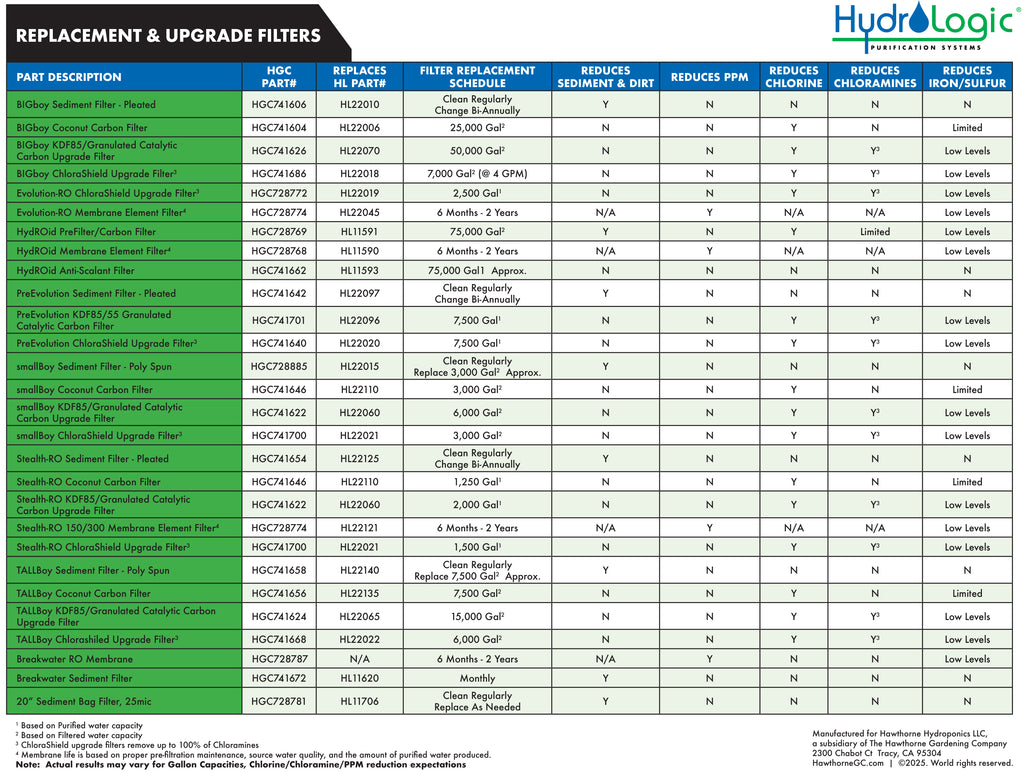
One-size-fits-all doesn’t work for RO maintenance. Customize your filter replacement based on three key factors.
Hard Water Requires Aggressive 6-Month Replacements
Hard water (high calcium and magnesium) causes scaling that clogs filters and membranes faster.
- Recommended schedule:
- Pre-filters: Every 6 months
- Membrane: Every 2 years (with a scale inhibitor installed)
- Add a scale inhibitor: Prevents mineral buildup and extends membrane life
- User feedback: Hard water households report better taste and flow with 6-month changes
If you see white scale on your faucet or inside the tank, you’re in a high-risk zone.
Well Water Demands Annual Testing and Strict Replacements
Private wells lack EPA regulation and often contain arsenic, nitrates, or bacteria.
- Filter schedule:
- Pre-filters: Every 6 months
- Membrane: Every 2 years
- Critical step: Annual professional water testing from an EPA-certified lab
- Sanitize yearly, or more often if odor develops
Well owners must be proactive. Contaminants can bypass filters if not monitored regularly.
High Usage Shortens Filter Life Significantly
Large families or commercial systems burn through filters faster than single-user setups.
- Residential (4+ people): 6-month pre-filter changes
- Commercial or whole-house systems: 4–6 month cycles
- Track usage: Use a flow meter or filter tracker app
More water flowing through means more contaminants filtered, which means shorter filter life.
Annual Maintenance You Should Never Skip
Beyond filter changes, these yearly tasks protect your system and water quality.
Sanitize the System Once a Year
Bacteria and biofilm grow in tanks and tubing over time, even with regular filter changes.
When to do it: During a filter change, ideally every 12 months
Sanitizer options:
– 1 cup hydrogen peroxide in the Stage 1 housing
– 2–3 tablespoons unscented household bleach
– Commercial non-bleach sanitizer
Step-by-step process:
1. Shut off water supply and drain the tank
2. Remove filters and reattach empty housings
3. Add sanitizer to the first stage
4. Turn water on and run 2 full cycles
5. Shut off, install new filters
6. Flush the tank completely before use
This kills microbes and keeps water tasting fresh.
Check Tank Pressure Yearly
The storage tank uses a pressurized bladder to push water to your faucet.
- Correct pressure: 7–8 PSI when empty
- How to check: Use a tire pressure gauge on the Schrader valve at the bottom of the tank
- Adjustment: Add air with a bicycle pump if low; release air if over 10 PSI
Low pressure causes slow flow or prevents the tank from filling properly. Check it every time you change filters.
Inspect for Leaks and Damage
A small drip can lead to significant water damage over time.
- Check: Filter housings, O-rings, tubing connections
- Fix: Tighten housings and replace cracked O-rings
- Pro tip: Label filters before removal to avoid mix-ups in multi-stage systems
Do this during every maintenance session.
Pro Tips for Long-Term Success

Maximize performance and lifespan with these expert-backed strategies.
Choose Quality Filters, OEM or Reputable Third-Party
- OEM vs. third-party: Many third-party filters match or exceed OEM quality at lower cost
- Key specs: Match micron rating (5-micron sediment, 0.5–1 micron carbon)
- Avoid cheap knockoffs: Poor seals or loose media can damage the system
Stick with reputable brands whether original or aftermarket.
Keep Spare Filters On Hand
- Storage: Cool, dry place; filters don’t expire
- Benefit: No downtime when it’s time to change
- Smart move: Buy in sets to save money and ensure compatibility
Label them with change dates to stay organized.
Track Changes with Apps or Calendar
- Options: Filter replacement tracker apps, Google Calendar, or a sticker on the unit
- Set reminders: 2 weeks before each scheduled change
- Add notes: Flow rate, taste observations, TDS readings
Tracking helps you spot trends and adjust schedules over time.
Don’t Skip Professional Water Testing
- DIY tools have limits: TDS meters and test strips don’t detect BPAs, bacteria, or all chemicals
- Recommendation: Annual EPA-certified lab test, especially for wells or high-risk areas
- Peace of mind: Confirms your system is removing what matters
Test even if water tastes fine. Many contaminants are invisible to the senses.
Frequently Asked Questions About Reverse Osmosis Filter Replacement
How do I know when my RO filter needs replacing?
Watch for slow water flow, bad taste or odor, cloudy water, or rising TDS readings. These signs indicate filters are exhausted even if you haven’t reached the calendar-based replacement date. A TDS meter reading rejection below 85% signals membrane failure, while chlorine test strips showing above 0.5 ppm on the wastewater line mean your carbon filter needs immediate replacement.
Can I go longer than 12 months between filter changes?
You can sometimes stretch to 12 months if you have excellent municipal water and low usage, but 6 months is the safer “sweet spot” for optimal taste and performance. Hard water, well water, and households with 4+ people should stick to 6-month replacements. Going longer risks damaging the RO membrane, which costs significantly more to replace than pre-filters.
What happens if I don’t replace my RO filters on time?
Neglecting filter changes causes two major problems. First, a clogged sediment filter forces debris through to the membrane, causing fouling and reduced water production. Second, an exhausted carbon filter allows chlorine to reach and permanently degrade the RO membrane. A $10 filter change protects a $100+ membrane, and both protect your family’s health from contaminants.
Are third-party RO filters as good as OEM?
Many third-party filters from reputable brands match or exceed OEM quality at lower prices. The key is matching the correct micron rating (5-micron for sediment, 0.5–1 micron for carbon) and choosing established manufacturers. Avoid ultra-cheap knockoffs with poor seals or loose media, as these can damage your system.
How long does a reverse osmosis system last?
A well-maintained RO system lasts 10–15 years, comparable to 60–85 human years. The system’s longevity depends entirely on strict adherence to filter replacement schedules and annual sanitization. Neglecting maintenance is the leading cause of premature system failure.
Do I need to sanitize my RO system if I change filters regularly?
Yes, annual sanitization is essential even with regular filter changes. Bacteria and biofilm accumulate in housings, tubing, and the storage tank over time. Sanitize once per year during a filter change using hydrogen peroxide, unscented bleach, or a commercial sanitizer to keep water fresh and safe.
Key Takeaways for Maintaining Your Reverse Osmosis System
Replacing reverse osmosis filters on schedule is the foundation of system health and water safety. Pre-filters need changing every 6–12 months, the membrane every 2–3 years, and the polishing filter annually. These intervals aren’t arbitrary; they protect the expensive membrane from chlorine and debris while ensuring your water stays clean.
The true key to longevity is adapting to your specific conditions. Hard water, well water, and high-usage households all require more aggressive schedules. Watch for warning signs like slow flow, bad taste, and rising TDS readings, because real-world conditions sometimes wear out filters faster than the calendar suggests.
Your next step is simple: check your records for when you last changed filters, mark your calendar for the next replacement, and order spare filters today. A few dollars spent on timely filter changes protects your membrane, extends your system’s life to 15 years, and ensures every glass of water is clean and safe.